I
Store
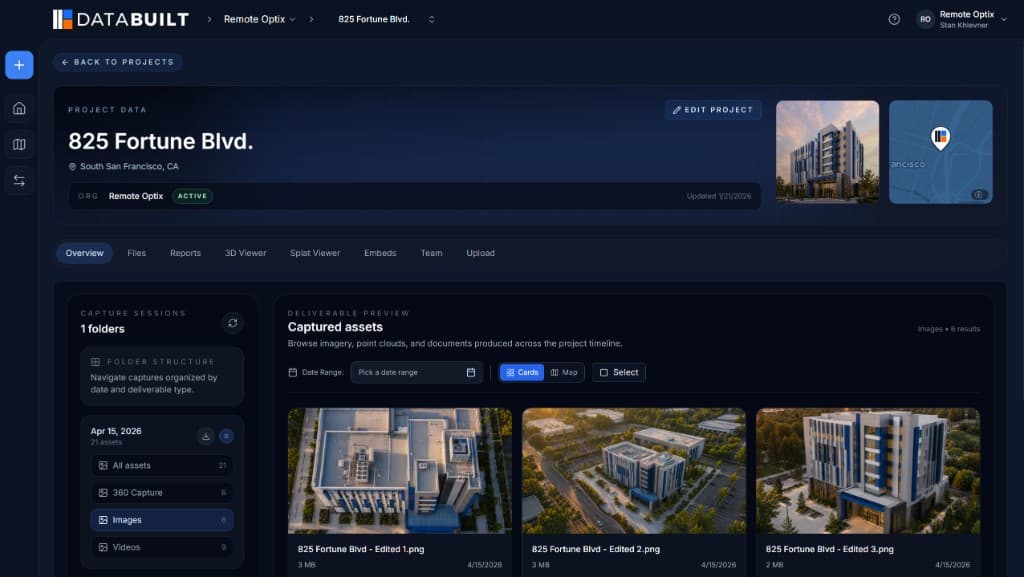
Every format your site produces, in one organized project record. Capture sessions, folders, and version history — not a dumping ground.
Spatial intelligence for the built world
DataBuilt is the common data platform for reality capture. Drone maps, point clouds, Gaussian splats, 360° panoramas, CAD and BIM — stored, visualized, analyzed, and shared from one browser tab. No viewers to install. No links that expire into the void.
Free 30-day trial. No credit card required.
01The problem
Reality capture has never been easier. Working with what you capture has never been harder. Every flight, scan, and walkthrough produces data that scatters across viewers, folders, drives, and expiring links — a record of the project that no one can actually read.
Exhibit A
One tool for point clouds. Another for panoramas. A third for the orthomosaic. Each format lives in its own silo, and nothing lines up.
Exhibit B
Terabytes of capture data parked on desktops and external drives — invisible to the people making decisions about the site.
Exhibit C
A download link here, an email attachment there. By the next milestone, nobody remembers which version was current.
02The platform
DataBuilt replaces the patchwork of viewers, folders, and file transfers with a shared source of truth for everything you capture.
I
Every format your site produces, in one organized project record. Capture sessions, folders, and version history — not a dumping ground.
II
Maps, models, splats, and panoramas rendered in the browser, geo-referenced to real-world coordinates. No installs, no plugins.
III
Measure distances, areas, and volumes. Overlay CAD and PDF plans against as-built conditions. Compare captures across time.
IV
Send one link instead of five exports. Clients, owners, and field teams see the same living record — from any browser, anywhere.
03Supported data
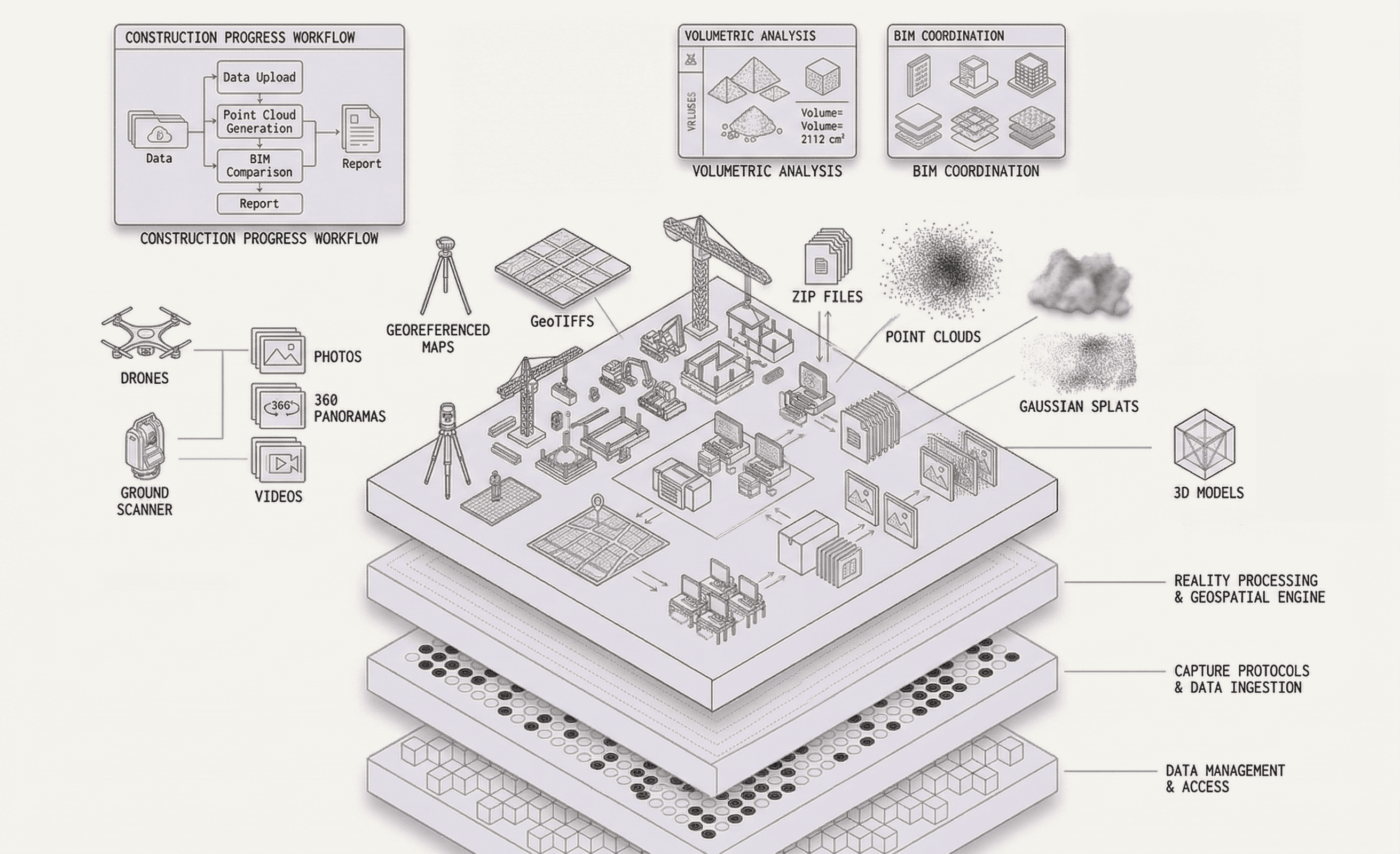
A common data platform only works if it speaks every format on the project. DataBuilt does — from raw DNG files to multi-gigabyte point clouds.
.JPG / .DNG
Geo-located
GPS / .SRT
Up to 8K
.PLY +
.TIF / .TIFF
.LAS / .LAZ
Overlay-ready
Design intent
04The workflow
01
Fly the site, scan the structure, walk the floor.
02
Drag in raw files — any format, straight from the field.
03
DataBuilt turns captures into browser-ready spatial data.
04
Maps, splats, and panoramas, geo-referenced together.
05
Distances, areas, volumes, and overlays — in the browser.
06
One link for clients, owners, and crews. No installs.
07
Query your project in plain language and get answers.
→ Repeat every capture. The record stays current; the workflow stays the same.
05Innovations
These aren't roadmap promises. They're shipping capabilities that make spatial data usable by the whole project team.
Imagery
Raw photos and DNG files land exactly where they were taken — pinned to real-world coordinates, browsable on the map instead of buried in a folder.
Panoramas
Drop into any panorama from its true position on site, then share it with a link. Walk a client through the building without either of you leaving a desk.
Video
Full-resolution immersive video, streamed in the browser. Inspect site conditions in detail that flat footage can't carry.
SRT
Drone video synced to its SRT flight log. Scrub the timeline and watch your position trace across the map, frame by frame.
PLY +
Photorealistic 3D scenes rendered natively in the browser — PLY and other splat formats, no desktop GPU workstation required.
Tools
Distances, areas, and volumes measured directly on your data. Analysis that used to need desktop software now ships with the link.
Overlays
Lay design drawings over as-built reality. See where the site matches the plan — and where it doesn't — in one aligned view.
Ask
Not a generic chatbot. Ask about your project in plain language and DataBuilt surfaces the right capture, location, or measurement.
06Who it's for
01 — Drone operators
Upload raw captures and hand off a finished, shareable deliverable — instead of managing exports, viewers, and follow-up requests.
02 — Surveyors
Keep coordinate-accurate data intact from capture to client. Deliver browser-based results without a desktop dependency.
03 — Construction project managers
Track real conditions against the plan with CAD overlays and fresh captures — without waiting on someone to export a report.
04 — Owners & developers
Open one link and see the project as it actually stands — progress over time, in context, with no software to learn.
05 — Field teams
Pull up panoramas, measurements, and plans from any browser on site. The office's data, finally usable in the field.
06 — Inspectors
Review 360° walkthroughs, geo-located photos, and high-resolution video before — or instead of — another site visit.
07Outcomes
Replaces the sprawl of viewers, folders, drives, and links.
Everything — splats included — runs in the browser.
Immersive video at the resolution you captured it.
Full platform trial. No credit card required.
When captures are visible the day they're flown, questions get answered before they become RFIs. The office sees what the field sees — without a file transfer in between.
No more exporting three formats for three stakeholders. Clients, owners, and subcontractors open the same live record, scoped to what they need to see.
Every capture session adds to a continuous, geo-referenced history of the site. When disputes or closeout come, the evidence is already organized.
08Pricing
Every plan starts with a free 30-day trial of the full platform. Upgrade when your projects outgrow it — not before.
$030 days
Full platform access. No credit card required.
$97per month
Or $77/mo billed annually. Cancel anytime.
Custompricing
For organizations with bigger sites and stricter requirements.
Free 30-day trial on every plan. No credit card required.
09Field notes
We stopped passing around hard drives and download links. The whole project lives in one place now, and the owner can see it the same day we fly.
Field Operations Manager
Commercial GC
I hand clients a link instead of a viewer install. Measurements, overlays, panoramas — it's all just there, in the browser, exactly where it should be.
Licensed Surveyor
Regional Survey Firm
Upload from the truck, processed before I'm back at the office. Splats, orthos, 360s — every format I shoot finally has one home.
Drone Operator
Reality Capture Team
10FAQ
The things drone operators, surveyors, and project teams ask before they switch.
Something else on your mind? team@databuilt.ai
Drone maps and orthomosaics, GeoTIFFs, point clouds, Gaussian splats (PLY and other formats), 360° panoramas, 360° video up to 8K, photos including DNG files, site videos with GPS timelines (SRT).
Final transmission
Upload your next capture and see it become a living, shareable record of the site — before the day is out.
Free 30-day trial. No credit card required.